Using Out-of-Network Resources in FormFusion
Printers and Email Servers
Out-of-network printers and email servers are configured by selecting them in FormFusion the way you would any other printer or email server. This process is similar to configuration of a MAPS printer or email server.
Printers can be specified at the environment level (in Environment Configuration), in a PrintDirector override, in a Test Print template override, or passed in an evilp call. Email servers can be specified in the EmailDirector.
ScriptDirector
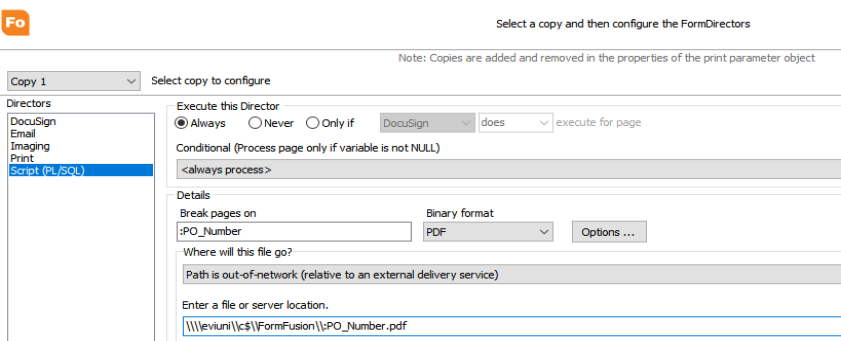
Under the Where will this file go? section, select the Path is out-of-network (relative to an external delivery service) option if the MAPS server does not have access to the specified path. The Evisions Delivery App server should have access to this path so it can copy the output to that directory. Note: the directory path must already exist in order to copy the output to that location.
ImagingDirector
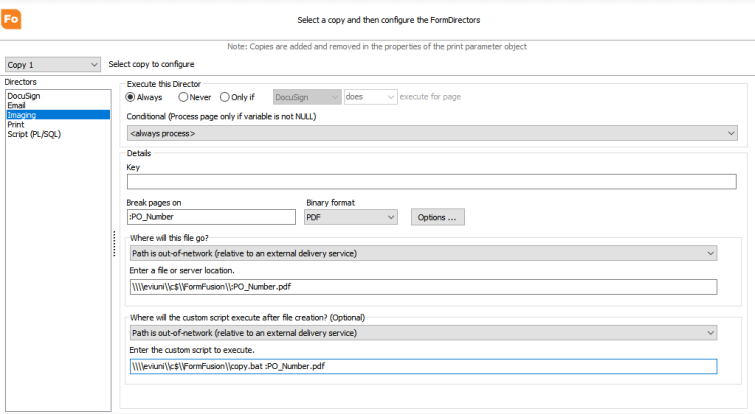
Under the Where will this file go? section, select the Path is out-of-network (relative to an external delivery service) option if the MAPS server does not have access to the specified path. The Evisions Delivery App server should have access to this path so it can copy the output to that directory. Note: the directory path must exist in order to copy the output to that location.
Under the Where will the custom script execute after file creation? section, select Path is out-of-network (relative to an external delivery service) if the script should run in the Evisions Delivery App server. This script can be any valid system command.
Troubleshooting
-
In ScriptDirector, you can specify an out-of-network file location, however any SQL script will still only run on the MAPS server.
-
The Delete file after script executes option in ScriptDirector is not supported for out-of-network jobs.
-
There will be differences in terms of how FormFusion processes Evisions Delivery App jobs versus in-network jobs. For example, in-network jobs will halt if ImagingDirector fails due to a bad path being configured (FormFusion knows the copy failed and can halt the run). If you configure a bad out-of-network path, FormFusion will not be able to identify this and will pass the job to the delivery queue as usual. The job will then continue to process.